


GreenLoop IT Solutions : Articles
GreenLoop’s Privileged Access Management for Endpoint and You
Privileged Access Management (PAM) is a security system that controls, monitors, and approves elevated actions on workstations. Instead of granting permanent local administrator rights to users, PAM provides just‑in‑time, case‑by‑case elevation, ensuring users can get work done responsibly—without broad, risky access.
On a day‑to‑day basis, PAM quietly runs in the background. When a user attempts an action that would normally require admin rights—such as installing an application or performing a system‑level change—the PAM system reviews the request, checks it against established rules, and routes it to IT for quick approval when needed.
At the same time, GreenLoop builds a list of applications that should always be allowed for your organization and adds to this policy over time, which improves operational efficiency. We review every request we haven’t seen before, but requests that are already matched by policy are automatically elevated and approved.
This is one of the latest plan features GreenLoop is adding to all Managed Security Plans at no additional cost.
Why should SMBs use Privileged Access Management?
- Protects Against Cyberattacks
In many SMBs, it’s common for all or many end-users to have full administrator rights on their primary work computer. However many people aren’t aware that one danger of this model is that an attacker who manages to compromise this computer (often by tricking an end user into downloading and running malicious software) can easily harvest all credentials that have been used to login to this computer. That expands the risk substantially. Other risks include attackers using access to install hidden malicious software to establish a persistent foothold.
With PAM in place, even if a user accidentally downloads something harmful, PAM helps prevent it from executing.
- Provides Transparency & Accountability
Every elevation request creates an audit trail that documents who attempted an action, what they attempted, whether it was approved or denied, and who approved it.
This helps you meet your compliance goals and otherwise ensure a consistent, policy-driven mechanism for providing IT oversight.
- Supports Productivity Without Compromise
Best of all, our PAM system ensures that users who need to be able to install approved software, updates, or system commands in order to perform critical job functions can still do so. GreenLoop creates rules that automatically approve key business software, yet continues to require approval for other requests.
PAM ensures they can get their work done without exposing your IT systems to unnecessary risk.
What to Expect When We Enable PAM
Based on our internal workflow and how we deploy the system for managed clients, here is what your team will experience:
- Seamless Installation
The PAM agent is deployed silently to your Windows workstations. It initially runs in audit mode, gathering information without enforcing changes.
After we’ve established a baseline, including creating allow-listing for commonly installed business apps, the system will transition to live mode.
- Requesting Elevated Access
Once live mode is enabled, anytime a user tries to install or update software that isn’t on your approved list, they may see a message indicating that the action requires approval.
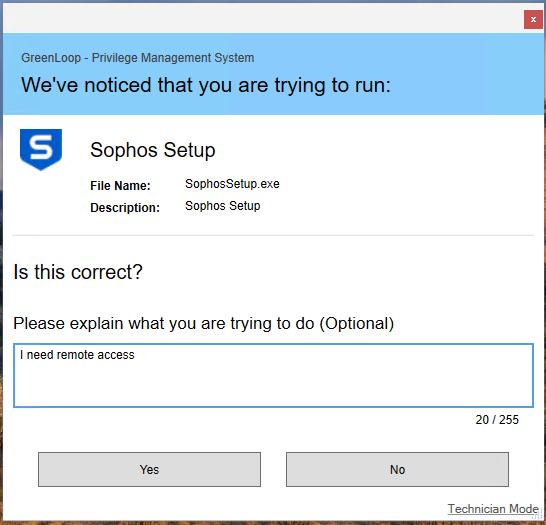
Tip: Don’t skip the “explanation” field! It’s really helpful for us to have more context into what you’re trying to accomplish whenever possible!
Behind the scenes, the PAM system automatically intercepts the request, creates a support ticket in our system, and sends a notification to our technicians. We’re on it!
- How Requests Are Handled
We understand that workflow interruptions are often a significant obstacle to implementing a secure permission management model where end-users don’t have local admin rights by default.
Your request moves through a defined workflow as quickly and efficiently as possible:
- A technician reviews the request and decides whether it can be safely approved. If we have any questions or need to deny a request, we’ll reach out to you to discuss or explain.
- While we try to review and approve these requests quickly, some requests may require further review and will be escalated to a more senior technician.
- We’re also on the lookout for requests that can be converted to a permanent rule in order to enable automatic approval going forward.
- Running the Application
Once approved—either temporarily or via a new rule—you will get a notification via email (and typically on your desktop as well).
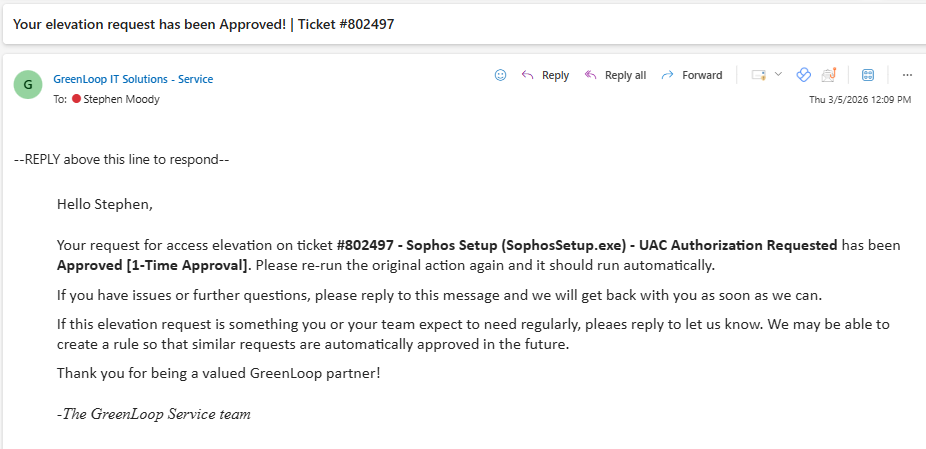
Example email notification
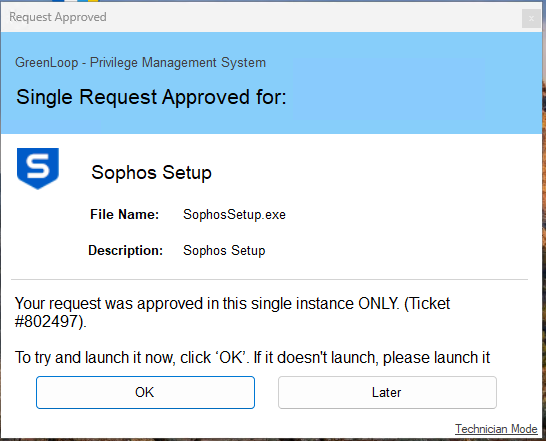
Example desktop notification
You should simply re‑run the original action (e.g. re-run an installer), or use the “launch now” action on the Request Approved screen. The now-approved action proceeds as expected.
If we’ve created a policy and the action is already allowed, you won’t need to wait for approval. Instead, the action will automatically run:
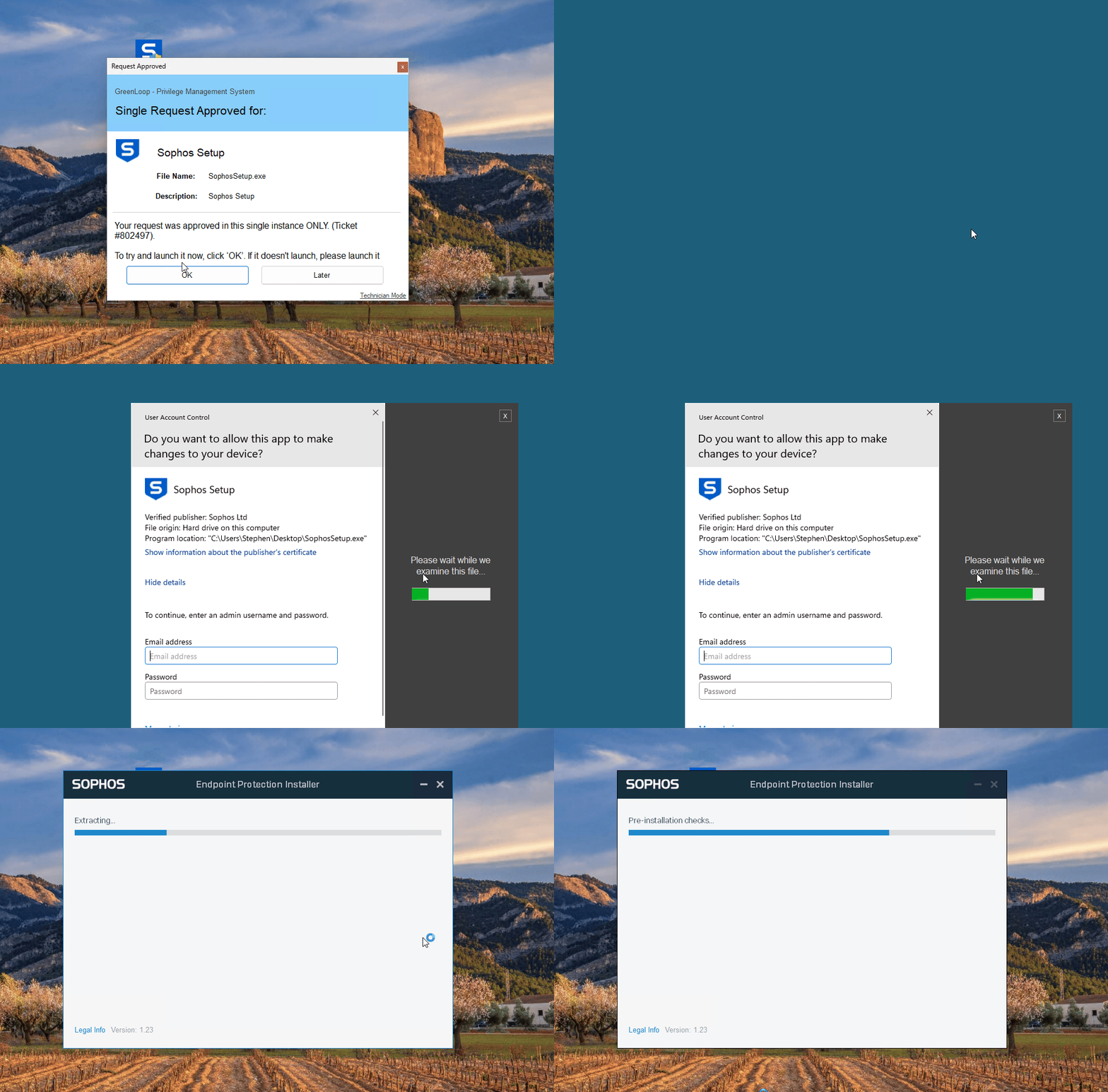
How PAM Benefits Your Organization
Stronger Cybersecurity
By securing the endpoint, you significantly reduce opportunities for threats to spread or take hold across your organization.
Operational Efficiency
Fewer support delays and more predictable software installations, without compromising security.
Standardized Control
The organization maintains consistent, policy‑driven management of administrative privileges—an essential part of modern security and compliance frameworks.
